Samsung · Mobile · Bangalore
4.4(1,422)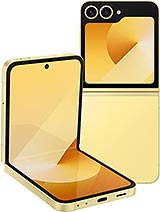

Samsung · Galaxy Z Flip6
Why customers trust Fixkart
10+ Years
In the repair business
4.4 Rated
1,422+ Google reviews
Fixkart Verified
Background-verified technicians
Pay After Repair
100% safe & cashless
A Galaxy Z Flip6 not turning on repair works out why the Galaxy stays dark — a drained or worn battery, a charging fault, a screen that has failed while the phone runs, or a mainboard fault — and fixes the one that is actually to blame.
Free diagnosis
Upfront quote, no obligation
Free pickup & drop
Collected & returned in Bangalore
Genuine parts
Brand-matched & quality-tested
1 Year warranty
On parts and labour
If you notice any of the following with your Samsung Galaxy Z Flip6, book a free diagnosis — catching it early keeps the repair simple.
Samsung's first step for a Galaxy that will not start is a forced restart: hold the Side key and Volume down together for more than 7 seconds, and let go when the logo appears. It erases nothing. If that fails, leave the Galaxy Z Flip6 on a charger you trust for half an hour and try again. Still dark after that? Then it is the battery, the charging board, the display or the board itself, and a bench check is the quickest way to tell which.
With a Flip6 that seems dead, the FlexWindow is your first clue. Press the side key with the phone closed: if the 3.4-inch FlexWindow shows the clock, the phone is running and only the main screen needs attention. If nothing lights, press and keep holding the side key together with volume down; after more than 7 seconds a hung phone should restart.
No response after that? Leave it on a 25W charger and look for warmth or the charging icon. If it charges but won't boot, a software or storage fault is likely; if it takes no charge at all, the battery or power circuit is checked. The technician measures what the phone draws from the charger to narrow it down.
Pickup & drop
Collected & returned
1 Year Warranty
Parts & labour
Genuine Parts
OEM quality
4.4 on Google
1,422 reviews
Bangalore
77+ Areas
096116 21405
Call anytime
Something else wrong with your Galaxy Z Flip6? We fix all of these in Bangalore, at your doorstep or by pickup depending on the repair.
Not a Galaxy Z Flip6? The same not powering repair is available for these Samsung models.
It depends on the part and on what the free diagnosis finds, so no fixed time is promised. Your Galaxy Z Flip6 is collected, repaired on our bench and brought back; the technician tells you the time for your Galaxy Z Flip6 before any work starts.
Yes — every Galaxy Z Flip6 not powering repair is covered by a 1 Year warranty on parts and labour. If the same issue recurs within the warranty period, we fix it free.
This repair is handled by free pickup & drop — we collect your Galaxy Z Flip6 from your Bangalore address, repair it on our bench, and return it to you, with status updates throughout.
No. Diagnosis is free and you get a clear, upfront quote before any work begins. You only pay once the not powering repair is complete and you have checked the device yourself.
Hold the side key and volume down together for more than 7 seconds until the phone vibrates or the logo appears. If nothing happens, charge it on a cable and try again before booking.
Press and hold the Side key and the Volume down key together for more than 7 seconds, and release them when the Samsung logo appears. Samsung notes that a forced restart does not delete anything. If nothing happens, charge the phone for at least half an hour with a cable and charger you know work, then try again.
Call the phone. If it rings or buzzes, or a computer recognises it over USB, the phone is working and the display has failed. That is a display replacement, which is a simpler job than a dead mainboard.
Not if the cause is the battery, the charging board or the screen — your data lives on the mainboard and comes back with the phone. If the board itself has failed, whether the data can be reached depends on getting that board running again, which is checked before anything else is done.
Certified technician · free diagnosis · pay after the repair
Browse other models, brands, and locations. Each repair page shows whether it is done at your doorstep or by pickup and drop, and the warranty it carries.
