On this page
Every iPhone battery wears out, so the real question is not whether you will need an iPhone battery replacement but when — and iOS tells you almost everything you need to decide. This guide covers how to read Battery Health and the cycle count, the five signs it is time, typical lifespan, what changes from the iPhone 15 and 15 Pro Max to the iPhone 16 Pro Max and iPhone 17 series, and what a doorstep replacement involves. If your battery is still healthy and simply draining quickly, start with our guide to fixing fast iPhone battery drain instead.
How to read iPhone Battery Health and cycle count
You do not need a third-party app — everything is built into iOS and takes under a minute to check.
- Open Settings > Battery and tap Battery Health & Charging (simply Battery Health on some iOS versions).
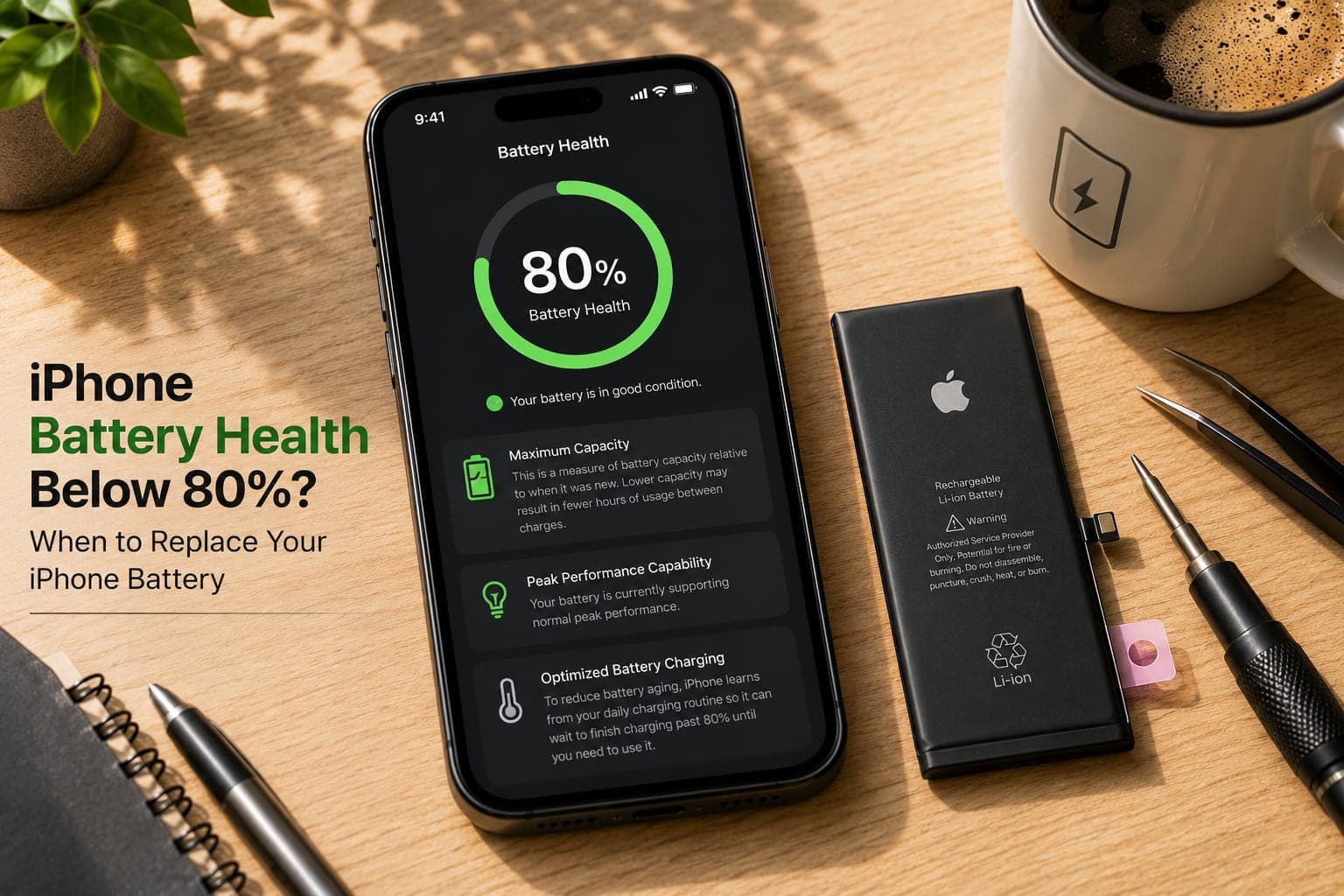
- Read Maximum Capacity. This compares the battery's current full charge with when it was new. 100% is a fresh battery; the figure only ever goes down.
- Look for a service message. Once capacity drops under 80%, iOS may display a notice that the battery's health has significantly degraded — Apple's own signal that it is worn.
- Check the cycle count (iPhone 15 and newer). On iPhone 15 and later, iOS shows a Cycle Count alongside Battery Health and under Settings > General > About. One cycle equals using 100% of the capacity in total — two half-drains count as one cycle.
- Read the Peak Performance Capability line. If it says performance management has been applied after an unexpected shutdown, iOS is slowing the phone because the battery cannot deliver enough power under load.
Good to know
Maximum Capacity is an estimate that iOS recalculates over time, so it can sit still for weeks and then drop a couple of points at once. Watch the trend over a month and the cycle count rather than a single 1% change.
5 signs it is time to replace your iPhone battery
One of these on its own is a hint. Two or more together mean the battery is done, and no settings tweak will bring it back.
- Battery Health is below 80%. This is the line Apple itself uses. Under 80% the battery holds noticeably less and struggles to deliver power in bursts.
- Sudden shutdowns. The phone dies at 20% or 30%, then shows a much lower reading when plugged in. A worn cell cannot hold voltage steady under a burst of load, so iOS shuts down to protect itself.
- Throttled performance. Apps open slowly, scrolling stutters and the camera lags because iOS has applied performance management to keep a weak battery stable. A new battery removes the throttle.
- Swelling or a lifting screen. If the display is rising at one edge or the phone no longer sits flat, the battery may be swelling. Stop charging it and get it replaced promptly — this is a safety issue, not just a runtime one.
- A full charge does not last a morning. If you leave home at 100% and are hunting for a charger before lunch with normal use, the battery is done, whatever the percentage says.
How long an iPhone battery typically lasts
Battery life is measured in charge cycles, not years. Apple rates the batteries in iPhone 14 and earlier to retain about 80% of original capacity at around 500 complete cycles, and iPhone 15 and newer to hold 80% at 1,000 cycles — roughly double. How fast you use those cycles depends on how you use the phone:
- Light use (calls, messages, an hour or two of screen time) — a cycle every two days or so; older models comfortably pass three years, iPhone 15 and newer well beyond.
- Typical use (social media, navigation, video) — about one cycle a day; expect two to three years before Battery Health drifts toward 80% on older models, longer on iPhone 15 and later.
- Heavy use (gaming, hotspot, delivery or ride-hailing work, constant charging) — more than a cycle a day plus heat; some batteries reach 80% in 18 months to two years.
Heat is the multiplier: a phone left on a dashboard, charged under a pillow or used for hours in Bangalore traffic ages faster than the cycle count alone suggests. If yours is still above 80% but drains quickly, our nine drain fixes usually recover the lost runtime.
Model notes: iPhone 15 to iPhone 17
The basic steps are the same on every iPhone, but the newer models changed a few details worth knowing before you book.
iPhone 15 and iPhone 15 Pro Max
The iPhone 15 generation was the first with the 1,000-cycle rating, the first to show the cycle count in Settings and the first with an 80% charge limit option. That higher rating means an iPhone 15 battery replacement is usually needed later than on an iPhone 13 or 14 — but heavy users who bought at launch are now reaching the 80% mark. The 15 Pro Max carries the larger cell, and its titanium frame and stacked-board design mean it should be opened by someone who has done it many times. Fixkart technicians handle iPhone 15 Pro Max battery replacement at your doorstep with the correct pull-tab adhesive release.
iPhone 16 and iPhone 16 Pro Max
The standard iPhone 16 and 16 Plus introduced an adhesive that releases when a low-voltage current is applied, making clean removal easier than the old pull strips. The 16 Pro Max kept the traditional tabs but gained one of the largest batteries Apple had shipped in a phone. Either way the swap is routine for a trained technician, and Battery Health, charge limits and Optimised Charging keep working afterwards. Book an iPhone 16 Pro Max battery replacement directly, or pick any other iPhone on the battery service page.
iPhone 17 series
The iPhone 17 line pushed capacity further, with the Pro Max carrying the biggest cell of any iPhone so far and the slim Air using a smaller, denser cell. These phones are still young, so a replacement is rarely about wear yet — more often it follows a swollen cell, water damage or a fall. The doorstep procedure is the same: choose your model on the iPhone battery service page and tell us the fault.
The Unknown Part notice, explained honestly
When an iPhone is fitted with a battery that Apple's systems cannot verify, iOS may show an Unknown Part notice under Settings > General > About, and Battery Health may add a note that Apple cannot verify the battery. The phone works normally: it charges, holds power, runs at full speed, and everything from Face ID to wireless charging is unaffected. What may change is the reporting — depending on the iOS version, the Maximum Capacity figure can be hidden or shown with a warning. The notice is a label about the part's origin, not a fault, and we tell you this plainly before the technician opens the phone.
Is it worth replacing an iPhone battery?
For most phones with battery health below 80%, yes. A battery change is the one repair that fixes several complaints at once, and the rest of the phone usually has years left in it. Weigh it on four things rather than on the percentage alone:
- Performance. Once an old battery has caused an unexpected shutdown, iOS limits performance peaks to stop it happening again, and Apple says that on a battery that has aged enough this can be lasting. Apple also says replacing a significantly degraded battery restores full performance and capacity — the slow camera and laggy scrolling go with the old cell.
- Peak capacity. A new battery starts again at 100% Maximum Capacity. On an iPhone 15 or newer that is a fresh 1,000-cycle rating; on an iPhone 14 or older, a fresh 500.
- Software support. iOS 27 runs on the same phones as iOS 26 — the iPhone 11 and later, plus the iPhone SE (2nd generation) and later. A phone still on the current iOS is worth keeping going; one that no longer gets updates is a weaker case.
- Resale or hand-me-down. Anyone buying a used iPhone can open the Battery Health screen, and a low figure is the first thing they notice. If you plan to sell the phone, exchange it or pass it to a family member, a fresh battery makes it easier to use from day one. Ask whether the new battery will show the Unknown Part notice described above, so you can tell the next owner honestly.
It is not worth it when the battery is only one of several major faults — a cracked screen, a damaged board and a worn battery together — or when Battery Health is still well above 80% and the drain started with an update. In that case the iOS update drain section of our battery drain guide is the place to start.
What happens during a doorstep iPhone battery replacement
You tell us the model and the fault, and a technician comes to your home or office. Here is the whole visit:
- Diagnosis first. The technician reads Battery Health and the cycle count with you, checks for swelling, and confirms the battery is the problem rather than the charging port or software.
- Replacement in front of you. The phone is opened on a clean mat at your table, the old cell is released and lifted out, and the new battery is fitted and sealed. The phone never leaves your sight.
- Done in a single visit. Most iPhone battery swaps, including the 15 Pro Max and 16 Pro Max, are finished while the technician is with you.
- Your data is untouched. A battery replacement never involves the storage chip. Photos, apps, chats and settings are exactly as you left them — no reset, no backup required.
- Checked before we leave. The technician confirms charging, Battery Health and all sensors, then explains the warranty and how to track your repair.
Doorstep iPhone battery replacement across Bangalore
Fixkart replaces iPhone batteries at home and at work across Bangalore — in Koramangala, Indiranagar, Whitefield, HSR Layout and Electronic City, and every neighbourhood on our Bangalore coverage page. Whether it is an iPhone 13 that has finally dropped under 80% or a 16 Pro Max shutting down at 25%, you get a certified technician, a battery matched to your model, and a replacement done in front of you and backed by our warranty. See everything we fix on the iPhone repair in Bangalore page, or contact us to book a slot.
Tip
Before the technician arrives, note your current Maximum Capacity and cycle count so you can compare afterwards. You will need to unlock the phone briefly to confirm the new battery reads correctly — enter the passcode yourself rather than sharing it.
How to make the new battery last
A fresh battery resets the clock, and a few habits stretch those cycles as far as they will go:
- Turn on Optimised Battery Charging in Settings > Battery > Battery Health & Charging. iOS learns your routine and holds the charge at 80% overnight, finishing just before you wake, so the cell spends less time at the stressful top end.
- Use the 80% charge limit on iPhone 15 and newer. The same screen lets you cap charging at 80% (newer iOS versions also offer 85%, 90% and 95%) — the kindest setting for the battery if you rarely need a full day away from a charger.
- Keep it cool. Heat ages a lithium cell faster than anything else: avoid charging under a pillow or in a hot car, and do not game while plugged in on a warm afternoon.
- Avoid regular deep drains. Topping up between roughly 20% and 80% is gentler than running to zero. Hitting 0% occasionally is fine; doing it daily is not.
- Use a good-quality charger and cable. A flimsy unbranded adapter runs hot, and that heat goes straight into the battery.
If your iPhone has other symptoms too, our roundup of common iPhone problems in 2026 helps you decide what to fix first.
Frequently asked questions
Replace it when Battery Health shows Maximum Capacity below 80%, when the phone shuts down suddenly at 20–30%, when iOS reports that performance management has been applied, or when a full charge no longer lasts a morning. Any swelling or a lifting screen means replace it straight away. If capacity is still above 80% and the phone simply drains fast, try software fixes first.
Book this repair
Pick your model to see what the repair involves and book a technician.
Fixkart Service Team
Certified Repair Technicians
The Fixkart Service Team is a group of background-verified, certified technicians who carry out doorstep phone, laptop, tablet and smartwatch repairs across Bangalore every day. Our guides are written from hands-on workshop experience and reviewed by senior technicians before publishing.