
Apple · Mobile · Bangalore
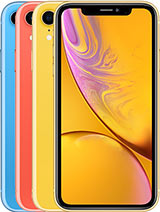

Apple · iPhone XR
Your repair is selected. Add your contact details and we’ll help you with the next step.
25,000+ customers since 2015
Why customers trust Fixkart
10+ Years
In the repair business
Fixkart Verified
Background-verified technicians
Pay After Repair
UPI, cash or card
Quick check before you book
Not sure if you need the full display or just the glass? Send a photo of the crack.
Send a photo of the screenAn iPhone XR original display replacement fits an original iPhone screen in place of a cracked, lined or unresponsive one. We replace the panel, then check touch, brightness, True Tone and Face ID before it goes back to you.
Free visit & quote
Diagnosis charge only if you decline the repair
Doorstep service
At your home across Bangalore
Genuine parts
Brand-matched & quality-tested
1 Year warranty
On parts and labour
The XR's 6.1-inch Liquid Retina is an LCD with True Tone and Haptic Touch. A cracked XR screen often keeps showing a picture with lines or a dark bleed, because the backlight is a separate layer.
Unlike the iPhone 11, the XR display is not tracked in Parts and Service History, so Settings cannot tell you whether a screen is Apple's. The technician shows you the part before fitting, moves the earpiece and Face ID assembly, and checks touch, brightness and True Tone after. A crack on an LCD can also let light leak at the edges, which a new panel fixes.
If you notice any of the following with your Apple iPhone XR, book a free visit — catching it early keeps the repair simple.
Screen damage tends to spread, and a partly working display can hide a touch fault. After a display replacement on iPhone 11 or later, Settings > General > About shows a Parts and Service History entry for the display. This is the option to choose if True Tone and full brightness matter to you; if you mainly want a working screen on an older iPhone, compare it with the compatible display for the iPhone XR.
Doorstep service
Home or office
1 Year Warranty
Parts & labour
Genuine Parts
OEM quality
Bangalore
77+ Areas
096116 21405
Call anytime
Something else wrong with your iPhone XR? We fix all of these in Bangalore, at your doorstep or by pickup depending on the repair.
Not a iPhone XR? The same original display repair is available for these Apple models.
It depends on the part and on what the technician finds, for a screen mainly whether you choose an original or a compatible display and whether the frame has to be replaced with it. Fixkart does not publish a fixed list price for iPhone XR original display repair: the exact amount for your iPhone XR is confirmed before any work starts, and you pay only after the repair, by UPI, cash or card. Send your model and a photo on WhatsApp for a quote.
The XR does not list its display in Parts and Service History, so Settings cannot show it. A technician can tell by inspecting the panel markings and image quality.
It depends on the part and on what the technician finds, so no fixed time is promised. Most iPhone XR original display repair jobs are done in a single visit at your door; the technician tells you the time for your iPhone XR before any work starts.
Yes — every iPhone XR original display repair is covered by a 1 Year warranty on parts and labour. If the same issue recurs within the warranty period, we fix it free.
Yes. iPhone XR original display repair is a doorstep service — a certified technician comes to your home or office anywhere in Bangalore and completes the repair in front of you.
No. The visit and quote are free, and you only pay once the original display repair is complete and you have checked the device yourself. If the device has to be opened to find the fault and you decide not to repair, a diagnosis charge applies — the technician tells you before opening it, and it is adjusted in your bill if you go ahead.
True Tone is checked on the new screen before the iPhone XR is handed back. Apple notes that on a non-genuine display True Tone may not work correctly, which is one of the main differences between the original and compatible options.
Yes, provided the Face ID parts themselves were not damaged in the drop. On iPhone 12 and earlier some of them sit on the display and are moved to the new screen, never replaced; on later iPhones they stay in the phone. Either way Face ID is tested, and if the diagnosis shows damage we tell you before any work starts.
On iPhone 11 and later, go to Settings > General > About and look for Parts and Service History. The Display entry there tells you how the iPhone recognises the screen that was fitted.
A compatible display is a new aftermarket screen made to fit the iPhone XR; an original display is the same type of screen the iPhone was built with. The original is the choice for True Tone and full brightness and carries the longer warranty; the compatible option suits an older iPhone or a tighter budget. Each has its own page with its own warranty.
Try Apple's own first steps before booking: restart the iPhone, clean the glass, take off the case and any screen protector, and unplug anything connected to the port. If the whole phone is frozen, a force restart (volume up, volume down, then hold the side button until the Apple logo appears) erases nothing. If touch is still dead while the picture is fine, the fault is in the touch layer, which is part of the display assembly — so the fix is an iPhone XR display replacement, and the diagnosis confirms it first.
Look at what freezes. If the clock stops and the buttons do nothing, the whole phone has hung — that is usually software, so force restart it and install the latest iOS update. If videos keep playing and the clock keeps moving but your taps are ignored, the phone is running and the touch layer of the display is failing, which commonly follows a drop or pressure on the screen.
A pink, green or white line that stays in the same place on every screen and after a restart is a fault in the display panel — no setting or update removes it, and it is fixed with an iPhone XR display replacement. Lines that only flash for a moment as the screen wakes are different: on the iPhone 14 Pro, Apple told its staff that was not a hardware issue and would be fixed by an iOS update, so update first if that is what you see.
Yes. Replacing the display does not touch the iPhone's storage, so photos, chats and apps stay exactly as they are, and the phone is never reset unless you ask. A backup before any repair is still a sensible habit if the screen works well enough to make one.
Do not rely on it. Apple says an iPhone's water resistance is not a permanent condition, and opening the display breaks the factory seal. New adhesive is fitted when the phone is closed, but treat it as splash protection only from then on.
Certified technician · free visit & quote · pay after the repair
Browse other models, brands, and locations. Each repair page shows whether it is done at your doorstep or by pickup and drop, and the warranty it carries.